 Twolight
Couch mode and 14 question decks
Couch mode turns one phone into a pass-and-play card game for two. Pick a deck, read the card out loud, and swipe when ready. Twolight has 14 decks with over 600 cards written by people, and the Starter deck of 40 cards is free forever.
Coming soon to iPhone
How does couch mode work?
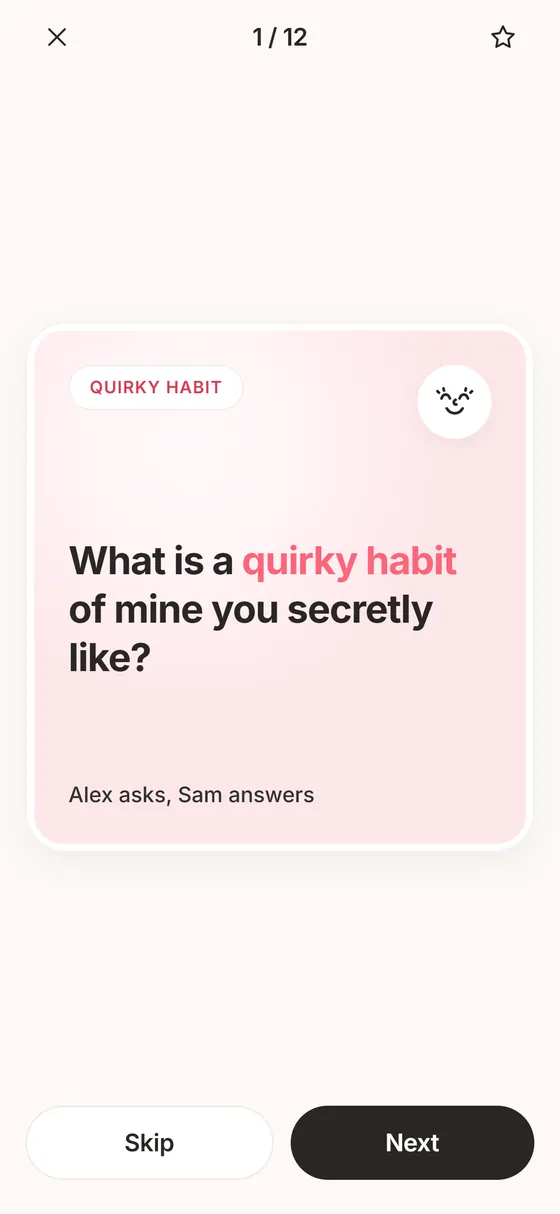
Choose a deck and Twolight deals cards one by one. The top line says who asks and who answers, for example Alex asks, Sam answers, and turns alternate. Read the card out loud, answer in conversation, then tap Next. Skip passes on a card, and a star keeps one for later.
When you stop, the summary says how many questions you covered and that nothing you said was saved. You can save the cards you starred to Answers, or share a card.
How do I run a first round?
Five or six cards make a good first round. Start with the free Starter deck and move to a deeper one once the first feels easy.
- Open Explore and tap Play or Talk to see the deck tiles.
- Tap a deck. Its screen shows a taste of the cards and the depth mix.
- Tap Play on one phone.
- Check the top line to see who asks and who answers, then read the card out loud.
- Answer in conversation. Tap Next when you both want the next card.
- Tap Finish when you are done. If you tap End partway, Twolight asks End for tonight? and lets you pick Keep going.
What are the 14 decks?
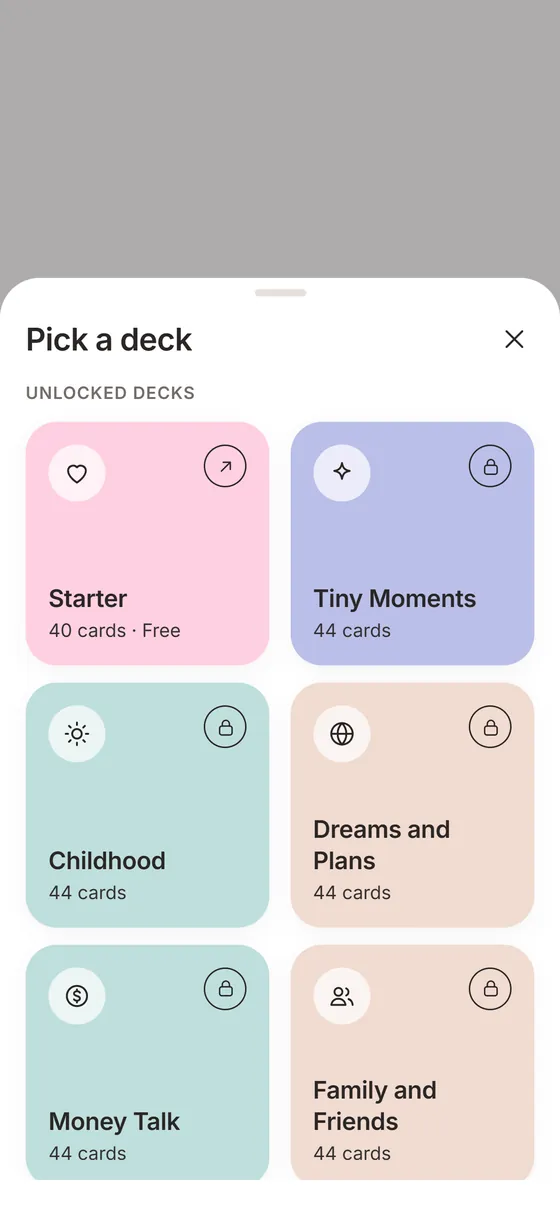
Each deck has a theme and a mix of light, warm and deep cards:
The Starter deck is free in full. The other 13 decks open with Plus, with a taste of each deck visible before you decide.
- Starter (40 cards, free): warm and easy for any couple.
- Tiny Moments: small joys and routines.
- Childhood: bedrooms, games, smells and the people who raised you.
- Dreams and Plans: someday trips and the life you are building.
- Money Talk: what money means to each of you, feelings and not budgets.
- Family and Friends: the people around you and your traditions.
- Gratitude: notice each other out loud.
- Play: silly questions and what-ifs.
- Hard Things: gentle, deeper questions.
- Parents Tonight: for couples with kids.
- Far Apart: questions for long distance.
- New Love: for the first year.
- Ten Years In: for long-term couples.
- Repair Conversations: for after a rough patch.
What do I see on screen?
Each card fills the screen with one question and a single keyword in coral. A progress counter shows where you are, and the hint line reads Read it out loud. Swipe when you are ready. Skip, Next and a star for keeping a card are on the same screen.
Some cards are followed by a Talk about it prompt, such as Tell me more about that or What is one small thing we could try this week? Those prompts are short on purpose. They keep the answer going without turning it into a debate.
How were the cards written?
Every card is written and edited by people, tagged by depth (light, warm or deep) and kept free of sexual content. Each card highlights one keyword in coral, for example What is a quirky habit of mine you secretly like? Thirteen decks hold 44 cards each and Starter holds 40, which is 612 cards in all.
How do I pick a deck for tonight?
Open Explore, then Play or Talk, and tap a deck to see a taste of it and its depth mix. Use Play on one phone to start couch mode, or send a card as tonight's bonus question.
When does couch mode fit?
It works anywhere two people can pass a phone back and forth:
- On the sofa after dinner, when the evening needs a shape.
- In the first months together, when you still have a lot to learn about each other.
- After the kids are asleep, with the Parents Tonight deck.
- While waiting for food at a restaurant, with the phone flat on the table between you.
- On a night when one of you has no energy to type, since nothing in a round needs typing.
How do I keep a round from feeling like homework?
Skip any card that does not fit, and do it without apologizing. The point is the talking. A round that ends after three cards because the third one started a long conversation went well.
Look at the depth mix before you pick a deck. On a tired night choose a deck that is mostly light cards, such as Tiny Moments or Play. Save Hard Things for an evening when neither of you is hungry or rushed. Star the cards you want to come back to, and they wait in Answers.
How is it different from a paper deck or a list of questions?
A paper deck needs no battery, and that matters if screens are the thing you are trying to get away from. Couch mode adds a few things paper cannot: it tracks whose turn it is, every card carries a depth tag, and starred cards go into your Answers list. It also keeps nothing you say.
A list of questions in a notes app has none of that structure, and you tend to scroll past the good ones. If you already own a physical deck and love it, keep using it. Twolight is for the nights you do not have it.
Frequently asked questions
Do I need a second phone for couch mode?
No. Couch mode is built for one phone that you pass back and forth.
Are my spoken answers recorded?
No. Couch mode saves nothing you say. It saves only the cards you star, and only if you choose to.
Can I preview a deck before I buy Plus?
Yes. Each deck screen shows a taste of the deck and its depth mix before you decide.
Is there a sexual deck?
No. The decks are about conversation and emotional closeness, and the content avoids sexual material.
Can I end a round early?
Yes. Tap End and Twolight asks End for tonight? You can confirm or tap Keep going. The summary then shows how many questions you covered.
Which deck should we start with?
Starter. It has 40 warm, easy cards and it is free. After that, pick by mood: Tiny Moments or Play for light evenings, Dreams and Plans for a medium one.