 Twolight
Tools for couples who live apart
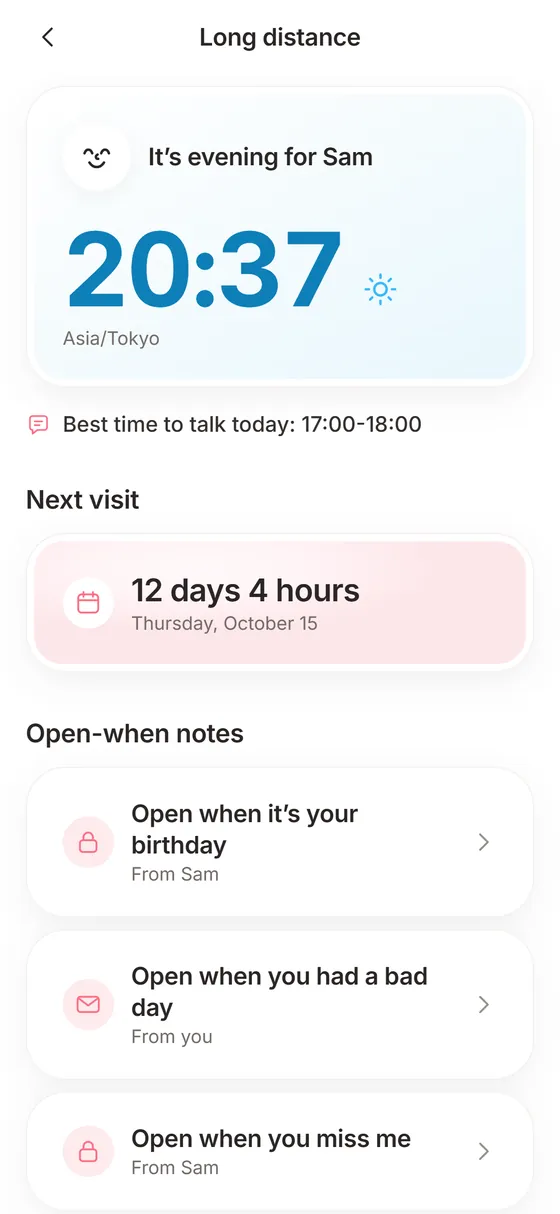
Twolight's long-distance screen shows your partner's local time with a plain-language state such as probably asleep or about to wake up, the best window to talk today, a countdown to your next visit and open-when notes you seal for them to open on a hard day.
Coming soon to iPhone
What does the dual clock show?
Add your partner's time zone and Twolight shows their current time and a state: probably asleep, about to wake up, evening or awake. A line below suggests the best time to talk today, for example 17:00 to 18:00. When your waking hours barely overlap on a given day, it says so.
How do I set it up?
Setup takes a minute:
- Open Us and tap Long distance.
- Tap Add time zone and pick your partner's.
- Read the clock line, for example your partner's local time and probably asleep.
- Tap Set the date and pick the day you see each other next.
- Open Special dates and add birthdays and anniversaries.
How does the visit countdown work?
Tap Set the date and pick your next visit. The screen counts days and hours, for example 12 days 4 hours, and says Today. Enjoy every minute. on the day. The Far Apart deck has questions made for the wait, such as What would we do in the first hour of our next visit?
How does the best-time-to-talk line work?
Twolight compares the waking hours on both clocks and shows a window such as 17:00 to 18:00 as the best time to talk today. On a day when the windows barely overlap, it says so. That saves you the mental math of converting time zones and the guilt of calling at 3 a.m.
What are open-when notes?
You write a note, pick an occasion (open when it is your birthday, when you had a bad day, when you miss me, or your own words), optionally lock it until a date, and seal it. The note travels as a link for your partner to open in Twolight. Sealed notes show Open when and Opens on a date until the time comes.
Sealing is a deliberate step. The button reads Seal and send, and after sending the note shows as Your note, sent to your partner, with a Send again option if the link got lost.
The dual clock and the visit countdown are free. Writing open-when notes opens with Plus.
How do I seal an open-when note?
Writing one takes a few minutes:
- Tap Write an open-when note.
- Choose an occasion: birthday, a bad day, I miss you, or your own words.
- Write what you would want your partner to hear then.
- Optionally lock it until a date.
- Tap Seal and send, and share the link through the iOS share sheet.
What else helps when you are apart?
A thinking-of-you tap sends a quick signal, five a day free and unlimited with Plus. Special dates keeps anniversaries and birthdays with reminders three days before and on the day. The daily question and Guess Me work across any distance, because everything travels by link.
Who is it for?
Couples in different time zones, couples with shift work who keep opposite hours, and couples who are together most of the year but apart for weeks at a time. It also suits couples who live in the same city but rarely see each other because of work.
How is it different from a world-clock app?
A world clock shows a number. Twolight shows a state in plain words (probably asleep, about to wake up) and ties the clock to a window to talk, a countdown and the daily question. Pick your partner's time zone once and everything else follows.
Twolight does not call or video chat, and it does not show where your partner is. It uses only the time zone you pick. Keep your usual call app for the call.
What does a week of using it look like?
On Monday you check the clock line before messaging. On Wednesday you answer the daily question on your own time and send the link. On Friday you play a Guess Me round, since a round works across any distance. Once a month you seal an open-when note for a day you know will be hard. The countdown stays on the screen the whole time, so the next visit never drifts out of sight.
Frequently asked questions
Do I have to enter my partner's time zone?
Only if you want to see their clock. Without it, Twolight asks you to add it.
Can my partner read a note before its open date?
No. A date-locked note shows when it opens, and the content stays sealed until then.
Does it work across countries?
Yes. Links travel through any messaging app, so distance does not matter.
Can I change the visit date?
Yes. The visit sheet has Save date and Remove date, so you can change the day or clear it if the plan falls through.
Does Twolight show where my partner is?
No. It only uses the time zone you choose for them.